# HaxeUI 1.0.0 official haxelib release!
**URL:** https://community.haxe.org/t/haxeui-1-0-0-official-haxelib-release/2065
**Category:** Haxe
**Tags:** gui
**Created:** [October 13, 2019, 9:00am UTC](https://community.haxe.org/t/haxeui-1-0-0-official-haxelib-release/2065 "2019-10-13T09:00:59Z")
**Posts on this page:** 6
**Page:** 1
### Author:  [@ianharrigan](https://community.haxe.org/u/ianharrigan)
#### Post date: [October 13, 2019, 9:01am UTC](https://community.haxe.org/t/haxeui-1-0-0-official-haxelib-release/2065/1 "2019-10-13T09:01:00Z")
So, _finally_, HaxeUIv2 has its official haxelib releases, version has bumped from around 0.0.4, to a shiny new 1.0.0! I realise most people using haxeui have gotten used to using master branch from github, but for new users who just want to test it out its a little cumbersome, so hopefully this will help ease that pain a little. There have been an incredible amount of updates and improvements, far to many too mention.
So the first thing to note is the “haxeui” haxelib is _not_ HaxeUI v2… … thats HaxeUI v1, which is an openfl only library, and a legacy version of openfl at that - so my advice would be to steer clear of it - its defunct, I’m not even sure it would even compile at this stage. HaxeUI v2 can work with _many_ backends (including native ones) to achieve UI.
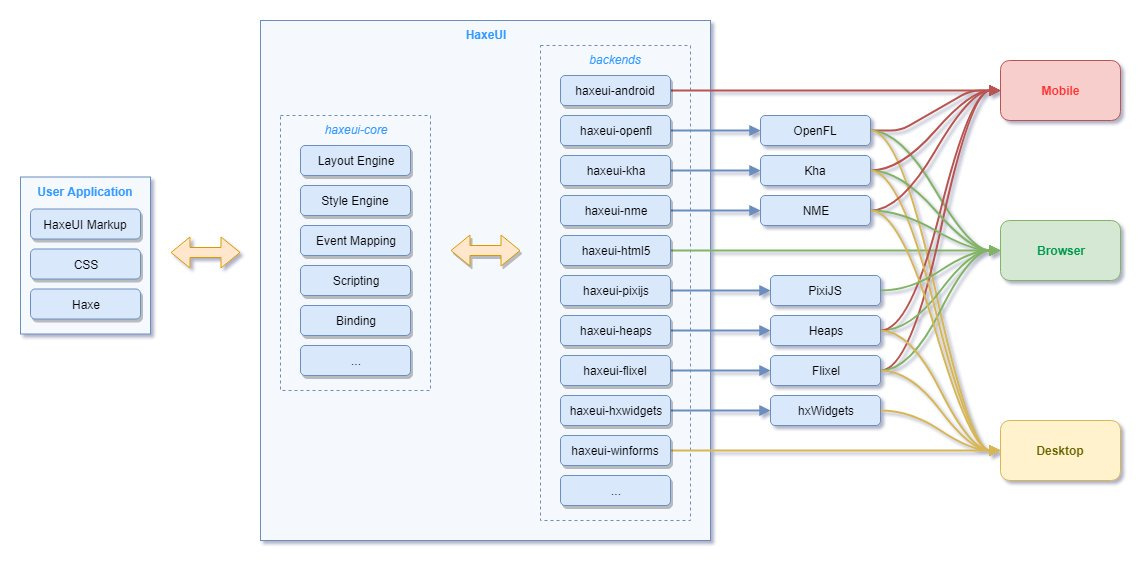
So this means you’ll need at least two libraries to get going, one is haxeui-core and the other would be the backend of your choice. So for example, for html5 apps (no host framework, just DOM) you would use “haxeui-core” and “haxeui-html5”. For native UIs via wxWidgets you would need three haxelibs: “haxeui-core”, “haxeui-hxwidgets” and “hxWidgets”. You would also, of course, need the C++ source of wxWidgets installed and working. HaxeUI also comes with a little command line utility help you on your way, so you can do things like:
- `haxelib run haxeui-core create html5` - this will create the .hxml file (and basic app) for haxeui-html5
- `haxelib run haxeui-core create hxwidgets --haxe-develop` this will create the .hxproj file (and basic app) for haxeui-hxwidgets
Assuming you are writing a “pure” haxeui application then you can switch between backends - so there is no framework lock in. By “pure” it simply means that you arent using specific features of the host framework / platform and instead delegate to haxeui for that.
If you have an existing HaxeUI v1 application then migration to v2 should be _fairly_ simple - if thats not the case, or something has gone very wrong, get in contact! Heres a bunch of ways to get in contact:
Forum: [https://community.haxeui.org/](https://community.haxeui.org/)
Github: [HaxeUI · GitHub](https://github.com/haxeui)
Discord: [https://discord.gg/xWmjRbg](https://discord.gg/xWmjRbg)
Twitter: [https://twitter.com/IanHarrigan1982](https://twitter.com/IanHarrigan1982)
Other ways to contribute: [Contribute - HaxeUI](http://haxeui.org/contribute/)
Finally here are some relevant links:
Site: [http://haxeui.org/](http://haxeui.org/)
Component Explorer: [Component Explorer - HaxeUI](http://haxeui.org/explorer/) (note this is still very much WIP and therefore most components arent in the app - but will be)
Playground: [Builder - HaxeUI](http://haxeui.org/builder/)
Component Examples: [GitHub - haxeui/component-examples](https://github.com/haxeui/component-examples) (not complete but a good starting point to get a feel for haxeui)
Guides: [GitHub - haxeui/haxeui-guides](https://github.com/haxeui/haxeui-guides) (also very much WIP, infact, only [haxeui-guides/modules.md at master · haxeui/haxeui-guides · GitHub](https://github.com/haxeui/haxeui-guides/blob/master/modules.md) and [haxeui-guides/custom-components.md at master · haxeui/haxeui-guides · GitHub](https://github.com/haxeui/haxeui-guides/blob/master/custom-components.md) are really “ready”)
Also, id like to thank the haxe team for a great language / platform! And the great community and, of course, any haxeui users, testers and contributors!
Cheers,
Ian
---
### Author:  [@uvtc](https://community.haxe.org/u/uvtc)
#### Post date: [October 13, 2019, 3:11pm UTC](https://community.haxe.org/t/haxeui-1-0-0-official-haxelib-release/2065/2 "2019-10-13T15:11:02Z")
Awesome news!
Regarding the version numbers, I think I understand. Is this correct? :
- “HaxeUI v1” (the older OpenFL-only library) is available at [https://lib.haxe.org/p/haxeui/](https://lib.haxe.org/p/haxeui/), but if you follow [the github link there](https://github.com/ianharrigan/haxeui) it reminds you that it’s old/archived.
- “HaxeUI v2” does not have a “haxeui” haxelib package at all — it has haxeui-core and friends. And all of those are version numbered at haxelib as 1.0.0 rather than 2.0.0.
Thanks!
---
### Author:  [@ianharrigan](https://community.haxe.org/u/ianharrigan)
#### Post date: [October 13, 2019, 3:45pm UTC](https://community.haxe.org/t/haxeui-1-0-0-official-haxelib-release/2065/3 "2019-10-13T15:45:47Z")
Yup… spot on…
So basically haxeui-core and friends is haxeui version 2, version 1.0.0 😕
😃
---
### Author:  [@uvtc](https://community.haxe.org/u/uvtc)
#### Post date: [October 13, 2019, 7:26pm UTC](https://community.haxe.org/t/haxeui-1-0-0-official-haxelib-release/2065/4 "2019-10-13T19:26:37Z")
Ah. Thanks. In that case, it may make sense to:
- update [the HaxeUI v1 readme](https://github.com/ianharrigan/haxeui/blob/master/README.md) and re-release to haxelib. Currently, the haxelib page for haxeui does not display a readme. Also, the current readme starts off with a heading of “HaxeUI Version 2”, which suggests that this is in fact version 2! The readme should state, “The haxeui haxelib package is deprecated. To get the current version of HaxeUI, install the haxeui-core haxelib package plus the relevant HaxeUI back-end package for your target.”
- drop mention of “HaxeUI **v2** ”, as now it’s just “HaxeUI” (the olde version is no longer maintained, correct?). It’s confusing to see “v2” when the haxelib package is versioned at 1.0.0.
---
### Author:  [@ianharrigan](https://community.haxe.org/u/ianharrigan)
#### Post date: [October 13, 2019, 7:46pm UTC](https://community.haxe.org/t/haxeui-1-0-0-official-haxelib-release/2065/5 "2019-10-13T19:46:02Z")
Yeah, it makes sense to drop any mention of v2… i mean, i think its only in the v1 readme to be fair… i dont refer / think of it as v2 really… but it does make sense to remove any mention of it as it could lead to confusion.
---
### Author:  [@Zhan](https://community.haxe.org/u/Zhan)
#### Post date: [October 15, 2019, 2:38pm UTC](https://community.haxe.org/t/haxeui-1-0-0-official-haxelib-release/2065/6 "2019-10-15T14:38:59Z")
Are there any demo office website? @ianharrigan
I found that
[http://haxeui.org/explorer/](http://haxeui.org/explorer/)
everything like flex components ,well done!