# Create custom project template in HaxeDevelop
**URL:** https://community.haxe.org/t/create-custom-project-template-in-haxedevelop/1708
**Category:** Haxe
**Tags:** ide, haxedevelop
**Created:** [April 29, 2019, 1:26am UTC](https://community.haxe.org/t/create-custom-project-template-in-haxedevelop/1708 "2019-04-29T01:26:45Z")
**Posts on this page:** 11
**Page:** 1
### Author:  [@mightymarcus](https://community.haxe.org/u/mightymarcus)
#### Post date: [April 29, 2019, 1:26am UTC](https://community.haxe.org/t/create-custom-project-template-in-haxedevelop/1708/1 "2019-04-29T01:26:46Z")
On the HaxeDevelop website it is written under “Project Management” that …
> **You can create, customize and share your own project templates.**
But how? I have some boilerplate code for 2D game production and it would be nice to just create a new project like “OpenFL 2D Game” with my init functions already built in.
Would be nice to speed up prototyping games, but I did not find anything how to do it on the [haxedevelop.org](http://haxedevelop.org) website.
---
### Author:  [@fullofcaffeine](https://community.haxe.org/u/fullofcaffeine)
#### Post date: [April 29, 2019, 1:59am UTC](https://community.haxe.org/t/create-custom-project-template-in-haxedevelop/1708/2 "2019-04-29T01:59:42Z")
When you say “template” you refer to parameterized templates, where you input some data at the moment you create it and the template gets customized with them? Because if that’s not needed, you can just git the boilerplate somewhere, clone a new copy whenever you need it and customize manually.
Another (perhaps overkill) option is to use something like Yeoman, which was made specifically for generating templates/boilerplates, it has a lot of niceties to help input the basic data in a more user-friendly way, among other things, but I never felt the need to use it, to be honest.
Can’t help you with HaxeDevelop though since I don’t use it, sorry.
---
### Author:  [@ianharrigan](https://community.haxe.org/u/ianharrigan)
#### Post date: [April 29, 2019, 6:23am UTC](https://community.haxe.org/t/create-custom-project-template-in-haxedevelop/1708/3 "2019-04-29T06:23:19Z")
Its a long time since i used them, but i remember writing similar for HaxeUI (version 1): [haxeui/templates/flash-develop at master · ianharrigan/haxeui · GitHub](https://github.com/ianharrigan/haxeui/tree/master/templates/flash-develop) - iirc, you just zip folders and file templates into a .zip with an .fdz extensions and drop it into a HD folder (which i cant remember now) and they should just appear…
---
### Author:  [@mightymarcus](https://community.haxe.org/u/mightymarcus)
#### Post date: [April 29, 2019, 10:06pm UTC](https://community.haxe.org/t/create-custom-project-template-in-haxedevelop/1708/4 "2019-04-29T22:06:31Z")
thank you, guys.
---
### Author:  [@elsassph](https://community.haxe.org/u/elsassph)
#### Post date: [April 30, 2019, 7:46am UTC](https://community.haxe.org/t/create-custom-project-template-in-haxedevelop/1708/5 "2019-04-30T07:46:50Z")
You can check the HaxePunk project template:
> **[HaxePunk/FlashDevelop](https://github.com/HaxePunk/FlashDevelop?files=1)**
>
> FlashDevelop template for HaxePunk. Contribute to HaxePunk/FlashDevelop development by creating an account on GitHub.
The FDZ file then needs to be opened by FD/HD to be installed in the right location in your user local data.
---
### Author:  [@fullofcaffeine](https://community.haxe.org/u/fullofcaffeine)
#### Post date: [April 30, 2019, 7:56am UTC](https://community.haxe.org/t/create-custom-project-template-in-haxedevelop/1708/6 "2019-04-30T07:56:20Z")
What’s the advantage of these kind of templates over just created something on say, github and cloning it everytime you start a new project off it?
---
### Author:  [@ianharrigan](https://community.haxe.org/u/ianharrigan)
#### Post date: [April 30, 2019, 8:13am UTC](https://community.haxe.org/t/create-custom-project-template-in-haxedevelop/1708/7 "2019-04-30T08:13:59Z")
Im not really sure there is a huge difference to be honest… I suppose the main thing is that the template is parameterised, (see: [haxeui/Main.hx.template at master · ianharrigan/haxeui · GitHub](https://github.com/ianharrigan/haxeui/blob/master/templates/flash-develop/%24(BaseDir)/Projects/600%20HaxeUI%20-%20HaxeUI%20Project/src/%24(PackagePath)/Main.hx.template#L1)), ie, the “${PackagePath}” but there isnt really that many options that you could provide there:
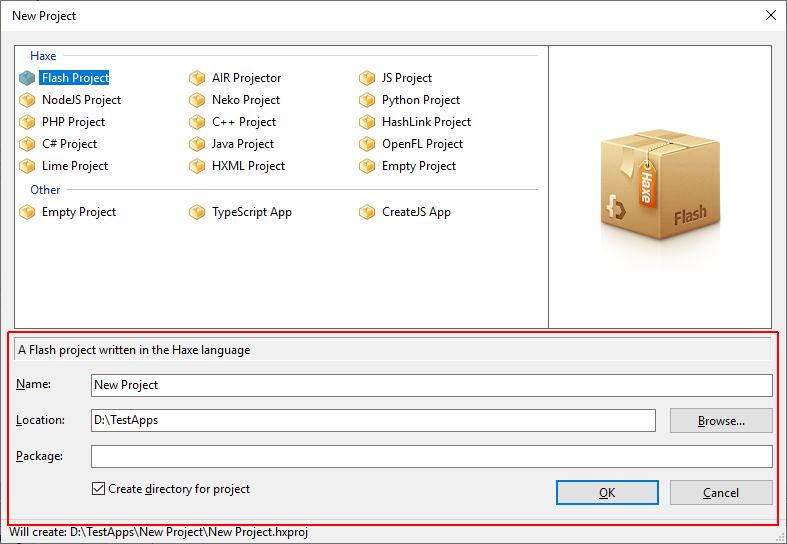
I dont really use these types of templates anymore to be honest (i use a command line) - it could well be that there are other params for the templates i just dont know about - i guess also, for first time users its nice to have a something in a UI to use…
Edit: if FD/HD had the option to then start up a wizard of somekind after this dialog then i think they would start to get more useful again (for me at least)
---
### Author:  [@elsassph](https://community.haxe.org/u/elsassph)
#### Post date: [April 30, 2019, 9:01pm UTC](https://community.haxe.org/t/create-custom-project-template-in-haxedevelop/1708/8 "2019-04-30T21:01:30Z")
I agree ultimately templates in the GUI are a bit old fashioned nowadays 🙂
But hey kids, it comes from a time when GitHub or Npm did not even exist!
That said, where are the CLI Haxe projects generators?
---
### Author:  [@Gama11](https://community.haxe.org/u/Gama11)
#### Post date: [April 30, 2019, 9:15pm UTC](https://community.haxe.org/t/create-custom-project-template-in-haxedevelop/1708/9 "2019-04-30T21:15:20Z")
@elsassph Mark made one once: [GitHub - markknol/hxnew: Create new Haxe projects in a blast](https://github.com/markknol/hxnew)
---
### Author:  [@elsassph](https://community.haxe.org/u/elsassph)
#### Post date: [April 30, 2019, 9:50pm UTC](https://community.haxe.org/t/create-custom-project-template-in-haxedevelop/1708/10 "2019-04-30T21:50:55Z")
Oh you’re right, I had forgotten it. I mean I did expect that there was something 😃
---
### Author:  [@ianharrigan](https://community.haxe.org/u/ianharrigan)
#### Post date: [May 1, 2019, 6:48am UTC](https://community.haxe.org/t/create-custom-project-template-in-haxedevelop/1708/11 "2019-05-01T06:48:29Z")
this is HaxeUI’s one: [haxeui-core/cli at master · haxeui/haxeui-core · GitHub](https://github.com/haxeui/haxeui-core/tree/master/cli)